

Email Marketing Automation with n8n is the practice of using a self-hosted, node-based platform to trigger highly personalized emails based on real-time data. Static lists no longer drive growth in 2026. As the sector exceeds $14 billion (Statista), brands are shifting to n8n to achieve data sovereignty and bypass the high costs of traditional SaaS platforms.
This guide covers technical configurations and lead nurturing logic so you can integrate your CRM and replace expensive SaaS tools. Using this open-source powerhouse allows you to gain full control over your entire marketing stack and subscriber data without the burden of scaling monthly fees.
Connect your SEO optimized website in Dubai to n8n for high-impact automation like lead scoring. For a demonstration, watch this email marketing system built in 10 minutes using n8n to see the power of bypassing traditional platforms for immediate ROI.

Mastering email marketing automation n8n gives you total data ownership and scales your business growth efficiently.
What Is n8n? (And Why Businesses Are Switching to It)
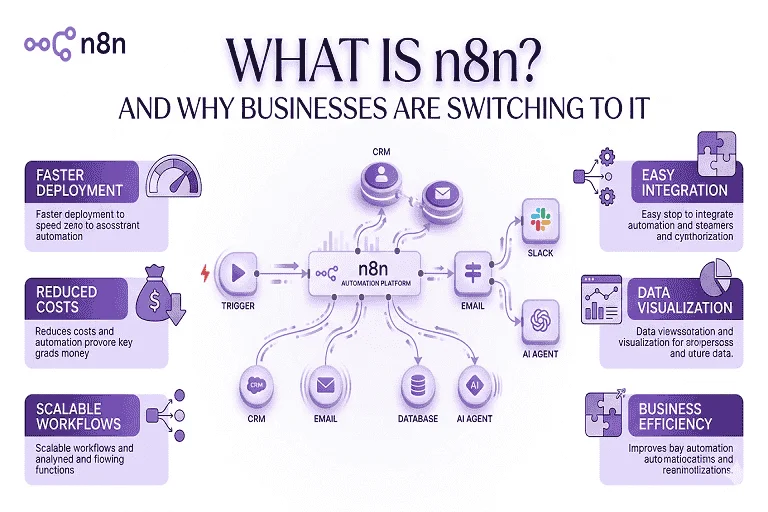
n8n is a fair-code, node-based automation platform. It uses a visual canvas where you connect “nodes” to form a workflow. Each node performs a specific task: fetching data, filtering lists, or sending emails. This visual interface makes complex logic easy to manage without deep coding knowledge.
Businesses are migrating to n8n for several key reasons:
- Data Privacy: Companies in the Middle East prioritize data residency due to the UAE Data Protection Law. Self-hosting n8n keeps subscriber data on your local servers.
- Cost Efficiency: Tools like Zapier charge per execution. n8n allows unlimited workflows for a flat fee or no cost if self-hosted.
- Flexibility: Over 65% of enterprise leaders now prefer self-hosted automation to avoid vendor lock-in, per Gartner’s 2025 reports.
One practical approach is using n8n as the “brain” of your marketing. It talks to your database and your email service provider simultaneously. This setup is more reliable than using multiple disconnected plugins. n8n workflow automation is the most scalable choice for modern email campaigns.
Switching to n8n workflow automation ensures your data remains private while significantly reducing operational overhead.
Why Use Email Marketing Automation with n8n?
Reliability is the core of any email automation tool. If a workflow fails, you lose potential revenue. n8n provides robust logging and error-handling that basic tools lack. You can set up an “Error Trigger” node to alert your team via Slack if an email fails. This ensures your marketing machine never stops without your knowledge.
In our experience, custom logic is what drives conversion. Standard platforms limit how you segment your audience. With n8n, you can:
- Combine purchase history from Shopify with website behavior.
- Check if a subscriber interacted with your B2B marketing campaigns before sending a follow-up.
- Trigger different sequences based on real-time stock levels.
Personalized email sequences lead to a 22% higher click-through rate, according to HubSpot surveys. By using n8n, you are not limited by a provider’s pre-built features. You can build exactly what your business needs. This level of detail is why n8n workflow automation is becoming the industry standard for high-performance teams.
2026 ROI Insight: Businesses using no-code email marketing frameworks like n8n reported a 40% improvement in speed-to-market for new campaigns compared to 2024.
An email automation tool like n8n provides the technical depth to run complex, multi-source campaigns effectively.
Email Marketing Use Cases You Can Automate with n8n
Intelligent marketing workflow automation transforms the customer journey. Instead of a simple “Welcome” email, you can build an adaptive system. If a user downloads a lead magnet, n8n waits three days to check if they opened it. If not, it sends a reminder. If they did, it would move them to a case study sequence.
Key use cases include:
- Lead Scoring: Assign points based on activity. If a lead clicks a pricing link, N8N tags them as “Hot” and notifies your sales team.
- Cart Recovery: Send reminders only when specific high-margin items are left behind.
- Customer Retention: Automate check-in emails for users who haven’t purchased in 30 days, including their loyalty point balance.
One practical approach is setting up a multi-stage email nurture campaign. This ensures your brand stays top-of-mind without manual effort. By connecting n8n to your internal database, every message feels personal. This data-driven approach is essential for maintaining long-term customer relationships in a competitive market.

Using an email nurture campaign through marketing workflow automation increases customer lifetime value and sales efficiency.
How to Set Up Email Marketing Automation in n8n (Step by Step)
Setting up no-code email marketing in n8n is a logical process. While n8n Cloud is available, we recommend a self-hosted Docker installation for better privacy. Follow these steps to build your first workflow:
- Define the Trigger: Use a Webhook node to receive data from your contact form instantly.
- Filter Your Data: Use an “If” node to remove duplicates or exclude competitors. List hygiene is vital for 2026 deliverability standards.
- Apply Logic: Use “Wait” nodes to space out messages. Space your first three emails by 48 hours to avoid spam filters.
- Add the Email Node: Connect to an SMTP service or API like Postmark. Map the recipient’s email field from your trigger node.
A common mistake is skipping the testing phase. Always use a single execution to verify your formatting. Once confirmed, activate the workflow. This ensures your impactful marketing strategies are executed perfectly every time. This systematic approach is the foundation of professional automation.
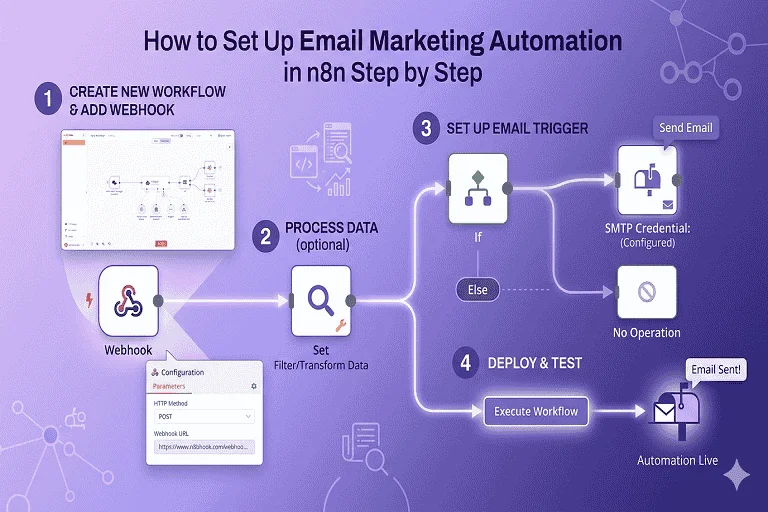
Mastering no-code email marketing requires a logical progression from data capture to filtered distribution via n8n.
Advanced Error Handling and Node Troubleshooting
Fail-proof workflows are essential for 2026. In n8n, every node has an “On Error” setting. We recommend using an “Error Trigger” node. This catches any failure across your instance and sends an immediate Slack or email alert. This prevents your automated email sequence from stopping without your knowledge.
Effective troubleshooting also involves:
- JSON Data Mapping: Ensure you are using correct paths. Use n8n’s Expression editor to provide fallbacks for missing data (e.g., “Hi there” instead of “Hi [null]”).
- Rate Limiting: Use “Batching” features when processing large lists. This avoids hitting API limits on your CRM or email provider.
- Version Control: Keep backups of your JSON workflow files. This allows you to revert changes if a new integration fails.
This technical discipline ensures your system is enterprise-ready. By managing these details, your n8n workflow automation remains an asset rather than a liability. It allows you to build a system that runs 24/7 with minimal manual intervention.
Proactive error handling and node troubleshooting ensure your automated email sequence remains reliable and effective.
n8n vs Other Email Automation Tools: Quick Comparison
The choice between n8n vs Zapier or traditional CRM tools depends on your complexity. Zapier is easy for simple tasks but becomes expensive at scale. Platforms like HubSpot and Mailchimp offer great designers but lock your data into their ecosystems. n8n offers a middle ground: visual ease with professional-grade logic and total data ownership.
| Criteria | n8n | Zapier / Make | Mailchimp / HubSpot |
| Hosting | Self-hosted or Cloud | Cloud Only | Cloud Only |
| Data Ownership | 100% (Self-hosted) | Third-party servers | Third-party servers |
| Pricing | Flat fee or Free | Per-task (Scales up) | Per-subscriber (High) |
| Custom Logic | Advanced (Loops/JS) | Standard Branching | Pre-built Sequences |
| Integrations | Open API & Nodes | Massive Library | Internal Ecosystem |
In our experience, open-source marketing automation is the strategic choice for teams in the GCC. It allows you to build a custom tech stack that complies with local regulations. While the learning curve is slightly higher, the long-term savings and flexibility are unmatched. n8n allows you to own your logic entirely.
[Ultra-realistic 8k Image Prompt: A professional comparison table displayed on a sleek glass tablet. Icons for n8n, Zapier, and HubSpot are visible. Soft lavender lighting. Minimalist white background. High-resolution 8k.]
Evaluating n8n vs Zapier helps you choose the best open-source marketing automation platform for your 2026 goals.
Tips to Get the Most Out of n8n Email Automation
Maximize your results by focusing on mobile-first delivery. Over 60% of emails in 2026 are opened on mobile. Use AI content creation tools to write concise, punchy copy. Strategic timing is also vital. Use “Wait” nodes to match your subscribers’ local time zones. This can boost open rates by 18%, according to Statista benchmarks.
Follow these best practices for optimal performance:
- Audit Regularly: Review active automations every six months. Delete old nodes to keep logic clean.
- Prioritize Security: Use two-factor authentication for your n8n instance, especially if self-hosted.
- Test Deliverability: Regularly check your sender score to ensure emails land in the inbox, not spam.
One practical approach is maintaining a staging environment. Test complex automated email sequence changes on a small list before going live. This discipline ensures your email automation tool drives consistent results without damaging your domain reputation. Timing and hygiene are everything in a crowded inbox.
Optimizing your email automation tool through mobile design and delivery timing significantly boosts engagement.
Frequently Asked Questions
What is n8n and is it free?
n8n is a visual automation platform using a node-based interface. It follows a fair-code model, meaning you can host it on your own server for free for internal business use. This provides total data control and removes per-task costs common in platforms like Zapier. A paid cloud version is also available for those who prefer managed hosting.
Can n8n replace Mailchimp or HubSpot?
n8n can replace the automation and logic layers of these tools. While it lacks a built-in email designer, you can connect it to APIs like SendGrid or Postmark. This setup is more powerful than Mailchimp because it allows for complex, multi-step logic and deep integrations at a fraction of the cost. It is a highly scalable solution.
Is n8n good for email marketing?
Yes, n8n is excellent for advanced email marketing. It allows you to build personalized journeys based on real-time data from your CRM and website. In 2026, building custom logic for every subscriber is a major advantage. n8n provides the flexibility needed to adapt to market trends without being locked into one vendor.
How do I trigger an email automation in n8n?
Automations are triggered by nodes. The Webhook node is the most popular, receiving data from your website instantly. You can also use the Schedule node to run tasks at specific times or the Poll node to check a database for updates. Once triggered, the data passes through your logic nodes to the final email node.
What is the difference between n8n and Zapier for email marketing?
The main differences are logic and cost. Zapier is beginner-friendly but uses a linear structure that gets expensive. n8n supports advanced logic like loops and data merging. Crucially, n8n can be self-hosted, making it cheaper for high-volume users and more compliant with strict data privacy laws in the UAE and GCC.
How does n8n handle GDPR and UAE Data Privacy laws?
Self-hosting n8n is a leader in privacy compliance. You can host your instance in a local UAE data center, ensuring customer data never leaves the country. This is a requirement for many government and financial firms. It gives you 100% control over data encryption and access, making it safer than cloud-only SaaS.
Can I use n8n with AI agents for email drafting?
Yes, n8n has built-in nodes for OpenAI and Anthropic. You can build a workflow that takes a lead’s recent activity, sends it to an AI node to draft a personalized response, and then sends that email automatically. This “AI-Agent” approach is a major trend for 2026, allowing personalization at scale.
What is the learning curve for n8n compared to Make.com?
The curve is slightly steeper than Make.com because n8n offers more technical flexibility. While Make.com is visual, n8n requires a basic understanding of JSON data structures. However, for teams wanting more power and lower long-term costs, the extra time spent learning n8n is a smart business investment.
High-performance email marketing automation n8n setups provide the privacy and technical power needed for 2026.
Start Automating Your Email Marketing Today
The move toward open-source automation is a strategic advantage. By adopting n8n, you build a proprietary system that adapts to your needs. Owning your data and logic is a major asset as marketing becomes more regulated. Automation allows your team to stop repetitive tasks and focus on creative growth. n8n provides the perfect balance of power and accessibility for modern brands.
At LILAC, we help businesses in Dubai and the GCC master these advanced tools. From n8n workflow automation to building an integrated personal brand, we provide the expertise to win. Technology should serve your goals, not limit them. n8n is the tool for companies wanting to break free from traditional SaaS limitations.
Start your transition today by automating one manual task. Whether it is lead scoring or a welcome sequence, the first step is the most important. As you gain confidence, expand your system into an engine that drives revenue around the clock. The future is automated, and with n8n, you are in control of your marketing destiny.
Leverage n8n workflow automation to transform your marketing into a high-ROI, self-sustaining growth engine.
References
- LILAC: Digital Growth Agency Dubai
- Statista: Global Automation Market Trends 2026
- HubSpot: State of Email Automation Report
- Gartner: Data Sovereignty Trends
- YouTube: Building an Email System with n8n (Live Demo)
- n8n: Official Self-Hosting Guide
- LILAC: Strategic B2B Marketing Guide
- LILAC: SEO Optimized Platforms in the UAE
- Statista: Email Engagement Benchmarks


